Every time you watch a video on YouTube, listen to music on Spotify or play a game on Twitch, you’re streaming. But what is the technology behind it all?
When you click to stream, the server sends data packets to your device in real time. The platform adjusts the quality to match your internet speed so the media plays without pauses (known as buffering).
Equipment
Streaming is a great way to cultivate a loyal audience. You can create engaging content, such as gameplay or special events, and build up a community. However, starting a streaming channel requires an investment in equipment. If you want to start streaming professionally, you will need a high-quality camera and microphone. You will also need a PC that is capable of running games and recording video. If you have a budget, you can purchase a gaming PC with an integrated graphics card that has the power to handle live streaming. You will also need a capture card to pipe video from your consoles into the PC for recording and encoding.
The quality of your stream is crucial in building a dedicated audience. A shoddy camera or audio will detract from the viewer experience, and they are likely to stop coming back. A good camera will record clear, crisp images with a minimum of distortion. It should also have a wide-angle lens to allow you to fit more into your frame.
A professional-quality microphone will ensure that viewers can hear you clearly and avoid background noise or echo. It is recommended that you invest in a headset with an external microphone input for better sound quality. Finally, a good lighting set-up will make you look more professional and improve your video quality. If you can’t afford professional lighting, a few ring lights and a simple key light will help you look your best.
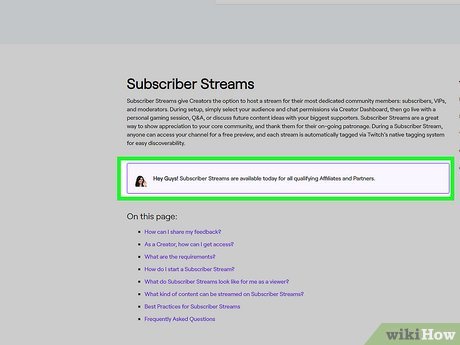
Choosing the right software is also important. While you can use any program that allows you to create a screencast, there are specialized programs designed for streaming. These programs have features that allow you to add overlays, transitions, and alerts to your broadcast. They also allow you to manage your chat and monitor the performance of your computer.
You can also use Twitch to monetize your content. Once you’ve established a following, you can earn money through advertisements and donations. This can help you cover the costs of your equipment and grow your audience. However, you should keep in mind that building an audience takes time. It’s crucial to focus on creating consistently quality content and building a community.
When choosing your hardware, it’s best to go with a well-respected brand for memory and storage. A reliable name-brand RAM and SSD will reduce the chances of a crash during a live stream or a game that doesn’t load properly. For example, Xidax uses branded performance RAM and SSDs in their high-end gaming rigs. They also offer a custom build service to help you get the best components for your streaming rig. If you’re going to spend money on your rig, consider investing in an Uninterruptible Power Supply (UPS) for your PC. This will protect your rig against sudden power outages or fluctuations that can damage video files.
Streaming software
If you’re looking to make a name for yourself in the streaming community, you need a high-quality gaming PC. Syber’s range of high-performance custom prebuilt gaming PCs are designed to be the perfect foundation for your broadcasting setup, ensuring you have the power and performance needed to keep your audience engaged.
Choose a system that is powerful enough to run your favorite games with ease and has sufficient memory to support multiple applications simultaneously. Ideally, you should aim for at least 16GB of RAM. A dual-core processor is also recommended, as it will allow you to work quickly and efficiently while streaming.
Next, you’ll need to install and configure the streaming software of your choice. There are many options available, but two of the most popular choices among streamers are OBS Studio and Streamlabs OBS. Both are free to use and offer a variety of features that can help you create a unique and engaging streaming experience.
OBS Studio offers a wide variety of customizable features, including the ability to add different scenes and overlays to your broadcast. You can also adjust your video bitrate to ensure that your stream maintains a high quality without consuming too much bandwidth. Another great feature of OBS Studio is its integrated chat and donation alerts, which allow you to easily promote your content and encourage viewers to donate to your channel.
Choosing the right microphone is essential for high-quality audio recording. Look for a mic with a built-in pop filter to reduce the plosive sounds that can disrupt your audio quality. It’s also worth investing in a microphone with a cardioid pattern, which captures sound mainly from the front of the mic. If possible, opt for a USB-connected mic for easy setup and compatibility with most streaming setups.
Once you’ve configured the software and hardware, it’s time to go live! Before you start streaming, you’ll need to verify your Twitch account. This can be done by entering your email address into the verification box on your Twitch dashboard. You can then set up 2FA, which will protect your account from unauthorized logins by sending you a security code to your phone each time you log in. Finally, remember to include a compelling bio in your profile and tag your game genre to improve your chances of finding new audiences.
Streaming hardware
Streaming has taken gaming to a whole new level. It’s not just a way to play video games; it’s a place for gamers to feel connected and understood. It’s also become a lucrative career path for many. Whether you’re playing the latest games or just talking with your viewers, it’s easy to monetize your content and make a living from it.
To start streaming, you’ll need some basic equipment. A good quality webcam, recording device, and microphone are essential. Depending on your budget, you can choose from a wide range of options. For example, you can use a built-in camera on your computer or go for a more professional option like a DSLR. There are also plenty of USB cameras that offer high-quality video and sound for less than $300.
You’ll also need a decent-sized hard drive and at least 16GB of RAM. This is important for storing your recordings and keeping your stream running smoothly. Lastly, you’ll need a high-performance GPU for graphics rendering and a fast CPU to handle the load of encoding and processing. The best gaming PCs are powerful enough to deliver crisp and clear visuals, while still maintaining a smooth frame rate.
Once you’ve got your gear sorted, it’s time to install and configure your streaming software. There are several popular options to choose from, including OBS Studio, Streamlabs, and Restream Studio. Each has its own set of features, but they all share a few core elements. They all allow you to create scenes with different video and audio sources and provide advanced customization and functionality. For example, you can add overlays and text to your stream, or customize the layout of your scene. You can also select a background and choose a font for your stream’s title, which helps you create a consistent look and feel for your channel.
Once you’ve built a loyal following, you can begin to earn money from your stream through subscriptions and donations. Many streamers also promote products in their chat through affiliate links, which allows them to earn a commission when their viewers click on and purchase a product from a merchant’s site. However, it’s important to treat monetization as a bonus rather than the main focus of your channel. Focus on creating great content and connecting with your audience, and over time, you’ll find that the small wins add up. It might take a while to get noticed, but with persistence, you could turn your stream into a full-time career.